



Data compression is fundamental to modern computing, though poorly understood by most users. We utilize compression tools like 7-zip and gzip routinely, often reducing file sizes to 30% or less of their originals.
Gaming heavily relies on compression for images, textures, geometry, and video assets. This ensures rapid loading and efficient storage, while enabling game state serialization into UDP packets for multiplayer networking. Sophisticated compression also powers collaborative tools like Scene Fusion, supporting features such as shared terrain editing with minimal bandwidth.
The fundamental compression principle is: Don’t store bits of data unless you absolutely need them.
Bit-packing represents the simplest compression form developers have employed for decades. The concept is straightforward: utilize minimal bits for storing data. When executed properly, significant size reductions occur.
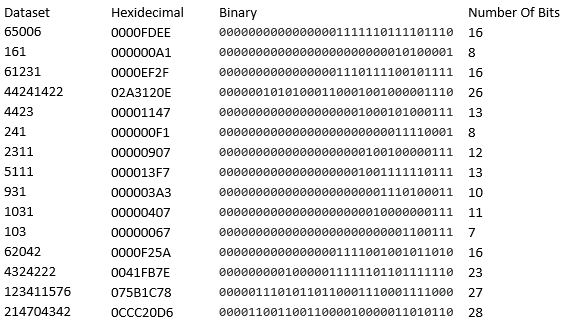
The dataset demonstrates that 68.8% of values can be stored using 16 bits or less. While separating values by size is possible when order is irrelevant, preserving sequence requires alternative strategies.
BitStreamReader and BitStreamWriter Implementation
The foundation requires classes enabling bit-level stream operations. Here is the C# implementation:
using System.IO;

namespace BitPackingExamples
{
    class BitStreamWriter
    {

        private int bitsInBuffer = 0;
        private byte[] buffer = new byte[1];

        public BitStreamWriter()
        {
            // clear the buffer
            buffer[0] = 0x00;
        }

        public int WriteBits(uint inputBits, int numBits, Stream outputStream)
        {
            if (numBits > 32) numBits = 32;
            int bitsWritten = 0;

            for (int i = 0; i < numBits; i++)
            {
                uint bit = (inputBits >> i) & 0x00000001;
                WriteToBuffer(bit, outputStream);
                bitsWritten++;
            }

            return bitsWritten;
        }

        public void WriteFlush(Stream outputStream)
        {
            if (bitsInBuffer != 0) {
                outputStream.Write(buffer, 0, 1);
            }
            buffer[0] = 0;
            bitsInBuffer = 0;
        }

        private void WriteToBuffer(uint bit, Stream outputStream)
        {
            if (bitsInBuffer == 8) WriteFlush(outputStream);
            if (bit != 0) // only write 1 bits. buffer is initialized to 0
                buffer[0] |= (byte)(bit << bitsInBuffer);
            bitsInBuffer++;
        }
    }

    class BitStreamReader
    {
        private int bitsInBuffer = 0;
        private byte[] buffer = new byte[1];

        public uint ReadBits(int numBits, Stream inputStream)
        {
            uint bits = 0;
            for (int i = 0; i<numBits;++i)
            {
                bits |= (ReadBit(inputStream) << i);

                // we have used up all the data!
                if (bitsInBuffer == 0 && !inputStream.CanRead) break;
            }
            return bits;
        }

        private int FillBuffer(Stream inputStream)
        {
            if (inputStream.Read(buffer, 0, 1) == 1)
            {
                bitsInBuffer = 8;
                return 0;
            }
            return -1;
        }

        private uint ReadBit(Stream inputStream)
        {
            if (bitsInBuffer == 0) {
                FillBuffer(inputStream);
            }
            if (bitsInBuffer > 0)
            {
                uint value = (uint)(buffer[0] >> (8 -bitsInBuffer)) & 1;
                bitsInBuffer--;
                return value;
            }
            return 0;
        }
    }
}
These classes enable reading and writing individual bits to streams like FileStream or MemoryStream, providing essential tools for compact data encoding.
Simple Single-Bit Header Approach
The simplest method employs a 1-bit header preceding a fixed number of value bits. The header functions as follows: a set bit (1) indicates 16-bit encoding, while an unset bit (0) indicates 32-bit encoding. This expands 32-bit values to 33 bits but reduces smaller values by 15 bits. For the sample dataset: 4×33 + 11×17 = 319 bits (approximately 40 bytes), achieving 33% compression.
// here are the values we want to compress
        static uint[] values =
        {
            0x0000FDEE,
            0x000000A1,
            0x0000EF2F,
            0x02A3120E,
            0x00001147,
            0x000000F1,
            0x00000907,
            0x000013F7,
            0x000003A3,
            0x00000407,
            0x00000067,
            0x0000F25A,
            0x0041FB7E,
            0x075B1C78,
            0x0CCC20D6
        };


        // simple 1-bit header for a single division
        static void Example1_SimplePack()
        {

            const int MAX_BITS = 28;
            const int MIN_BITS = 16;
            MemoryStream packedData = new MemoryStream();
            BitStreamWriter bitWriter = new BitStreamWriter();

            // bit packing the values:
            // bit header 1, then value bits = 16, bit header 0, value bits = 32
            foreach (uint v in values)
            {
                uint size = CountBits(v);

                // if there are 16 bits or fewer, write only 16+1 bits
                if (size <= MIN_BITS)
                {
                    bitWriter.WriteBits(1, 1, packedData);
                    bitWriter.WriteBits(v, MIN_BITS, packedData);
                }
                else
                {
                    bitWriter.WriteBits(0, 1, packedData);
                    bitWriter.WriteBits(v, MAX_BITS, packedData);
                }
            }
            bitWriter.WriteFlush(packedData);

            Console.WriteLine("Original size = {0}, packed size = {1}", values.Length * sizeof(uint), packedData.Length);

            // now read the data back
            //
            // rewind our stream so we can read it back
            packedData.Seek(0, SeekOrigin.Begin);
            BitStreamReader bitReader = new BitStreamReader();
            uint[] output = new uint[values.Length];

            for (int i = 0; i < output.Length; ++i)
            {
                uint header = bitReader.ReadBits(1, packedData);
                switch (header)
                {
                    case 1:
                        output[i] = bitReader.ReadBits(MIN_BITS, packedData);
                        break;
                    case 0:
                        output[i] = bitReader.ReadBits(MAX_BITS, packedData);
                        break;
                }
                if (output[i] == values[i]) Console.WriteLine("Position {0} matches!", i);
            }
        }
Single-bit headers work effectively when compression gains exceed the 1-bit overhead added per value. Division point selection significantly impacts results.
Multi-Level Variable-Length Headers
More aggressive compression employs variable-length headers supporting multiple value sizes:
- 1-bit value (1) indicates smallest size
- 2-bit value (01) indicates medium size
- 2-bit value (00) indicates largest size
This “escapement” scheme uses the initial bit as a flag for additional information. Testing with 32-bit, 16-bit, and 13-bit divisions yields 38-byte compression while supporting full 32-bit values.
// length range where bits <= 16
        static void Example2_2Divisions()
        {
            MemoryStream packedData = new MemoryStream();
            BitStreamWriter bitWriter = new BitStreamWriter();

            const int MAX_BITS = 32;
            const int MED_BITS = 16;
            const int MIN_BITS = 13;

            // let's pack them into a stream!
            foreach (uint v in values)
            {
                uint size = CountBits(v);

                // if there are 16 bits or fewer, write only 16+1 bits
                if (size <= MED_BITS)
                {
                    if (size <= MIN_BITS)
                    {
                        bitWriter.WriteBits(1, 1, packedData);
                        bitWriter.WriteBits(v, MIN_BITS, packedData);
                    }
                    else
                    {
                        bitWriter.WriteBits(2, 2, packedData);
                        bitWriter.WriteBits(v, MED_BITS, packedData);
                    }

                }
                else
                {
                    bitWriter.WriteBits(0, 2, packedData);
                    bitWriter.WriteBits(v, MAX_BITS, packedData);
                }
            }
            bitWriter.WriteFlush(packedData);

            Console.WriteLine("Original size = {0}, packed size = {1}", values.Length * sizeof(uint), packedData.Length);

            // now read the data back
            //
            // rewind our stream so we can read it back
            packedData.Seek(0, SeekOrigin.Begin);
            BitStreamReader bitReader = new BitStreamReader();
            uint[] output = new uint[values.Length];

            for (int i = 0; i < output.Length; ++i)
            {
                uint header = bitReader.ReadBits(1, packedData);
                switch (header)
                {
                    case 1:
                        output[i] = bitReader.ReadBits(MIN_BITS, packedData);
                        break;
                        // if the bit is 0, there is a second bit with length subsections
                    case 0:
                        uint secondBit = bitReader.ReadBits(1, packedData);
                        if (secondBit == 0)
                            output[i] = bitReader.ReadBits(MAX_BITS, packedData);
                        else
                            output[i] = bitReader.ReadBits(MED_BITS, packedData);
                        break;
                }
                if (output[i] == values[i]) Console.WriteLine("Position {0} matches!", i);
            }
        }
Explicit Bit-Count Headers
An alternative approach encodes a 5-bit header specifying the exact bit count, followed by that many value bits. While less efficient for this particular dataset (39 bytes), this method offers flexibility for datasets with numerous small values.
// We could just explicitly write the total number of bits prior to each value, so each header is 5 bits,
        // but then the value is perfectly packed every time
        static void Example3_ExplicitHeaders()
        {
            MemoryStream packedData = new MemoryStream();
            BitStreamWriter bitWriter = new BitStreamWriter();

            // packing
            foreach (uint v in values)
            {
                uint header = CountBits(v);
                bitWriter.WriteBits(header, 5, packedData);
                bitWriter.WriteBits(v, (int)header, packedData);
            }
            bitWriter.WriteFlush(packedData);

            Console.WriteLine("Original size = {0}, packed size = {1}", values.Length * sizeof(uint), packedData.Length);

            // now read the data back
            //
            // rewind our stream so we can read it back
            packedData.Seek(0, SeekOrigin.Begin);
            BitStreamReader bitReader = new BitStreamReader();
            uint[] output = new uint[values.Length];

            for (int i = 0; i < output.Length; ++i)
            {
                uint header = bitReader.ReadBits(5, packedData);
                output[i] = bitReader.ReadBits((int)header, packedData);
                if (output[i] == values[i]) Console.WriteLine("Position {0} matches!", i);
            }
        }
Further Optimization
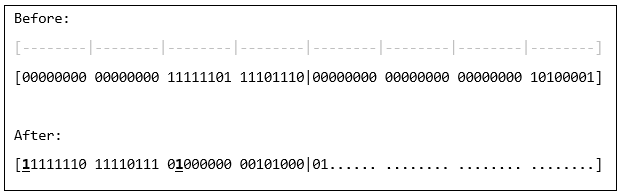
Additional refinement involves making the most significant bit implicit rather than encoded. By storing remaining bits after the 5-bit length header, the example dataset compresses to 37 bytes (36.75 exactly).
Conclusion
Basic bit-packing requires tailoring encoding rules to your specific data distribution for optimal compression. Complete source and project files are available at https://github.com/ks-examples/BitPacking101.
In the next post in this series, we look at entropy coding, a more advanced technique for achieving even greater compression ratios, with the possibility of packing 1 bit of data in less than 1 bit of memory.
These are the same building blocks, bit-packing and the techniques layered on top of it, that our server-authoritative Unity multiplayer engine Reactor uses to keep per-object network updates small. The difference is that you do not write any of it. Reactor builds the data model from your game state and tunes the encoding automatically, which is how games on it run at under a byte per transform.